Let me guess — you've heard the word “SEO” about 47 times this week, and you're still not 100% sure what it actually means.
Don't worry, you're in the right place.
SEO, or Search Engine Optimization, is the process of making your website easier to find on Google and other search engines without paying for ads. It's one of the most powerful long-term strategies in digital marketing, and the good news is that you don't need to be a developer or a tech genius to get started.
In this guide, I'll walk you through exactly what SEO is, how it works, and what you should actually focus on as a beginner in 2026. No fluff, no jargon, just a clear and honest starting point.
Fair warning: I'm still learning a lot about this myself. SEO is one of those fields where no one knows everything, and anyone who claims they do is probably trying to sell you something. But what I'll share here is grounded in what genuinely helps beginners move forward.
What is SEO and how does it work?
SEO stands for Search Engine Optimization. In simple terms, it's the practice of improving your website so that Google, and other search engines, can understand what your content is about and then show it to people who are searching for that topic.
Think of Google as a librarian. Every time someone types a question into the search bar, that librarian races through billions of web pages to find the most relevant, trustworthy, and well-organized answer. SEO is how you make your website the one the librarian recommends.
Here's the basic process:
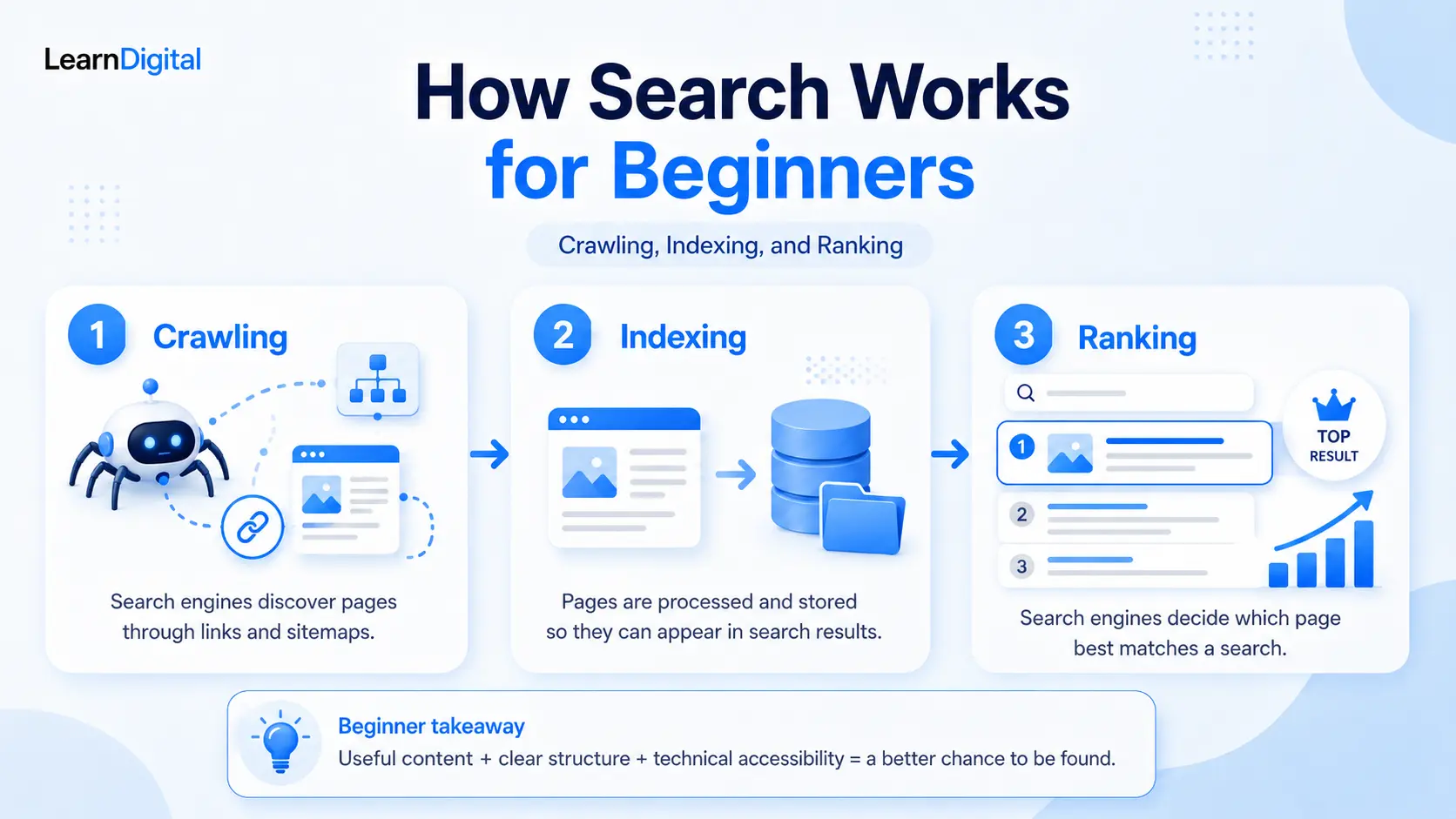
- Crawling: Google's automated bots browse the internet and scan web pages.
- Indexing: Once a page is crawled, it can be stored in Google's massive index, basically a giant catalog of the internet.
- Ranking: When someone searches, Google pulls from that index and decides which pages best match the search.
Your job with SEO is to help Google do all three of those things more easily: crawl your site, understand your content, and rank it for the right searches.
Why does SEO matter for beginners?
Here's the honest truth: when you're just starting out, you're probably not going to throw money at Google Ads straight away, and you shouldn't have to.
Organic search traffic, the kind you get for free through SEO, is one of the most sustainable and cost-effective ways to grow an audience over time.
Yes, it takes longer than paid advertising. We'll talk about that more below. But once your pages start ranking, they can bring in traffic 24/7 without you spending a single euro, dollar, or dinar on ads.
For anyone building a blog, a website, or an online business, SEO basics are non-negotiable.
The 3 core types of SEO you need to know
Before we dive into steps, it helps to understand that SEO has three main areas. Don't worry, you don't need to master all three at once. But knowing they exist will help you understand why certain tasks matter.
On-page SEO
This is everything you do directly on your web pages, like using the right keywords, writing clear headings, optimizing your page titles, and making sure your content actually answers what the reader is looking for. This is where most beginners should start, and it's the most within your control.
Technical SEO
This covers the behind-the-scenes stuff that helps Google crawl and index your site properly. Things like page speed, mobile-friendliness, site structure, and making sure there are no broken links or indexing errors. It sounds scary, but the basics are manageable even for non-technical beginners.
Off-page SEO
This is mostly about building your website's authority and reputation, primarily through backlinks, which are other websites linking to yours. Think of each backlink as a vote of confidence. The more credible sites that link to you, the more Google can begin to trust your site. Off-page SEO is harder to control and takes time, so it's usually the last thing beginners focus on.
Step 1: Understand what your audience is searching for
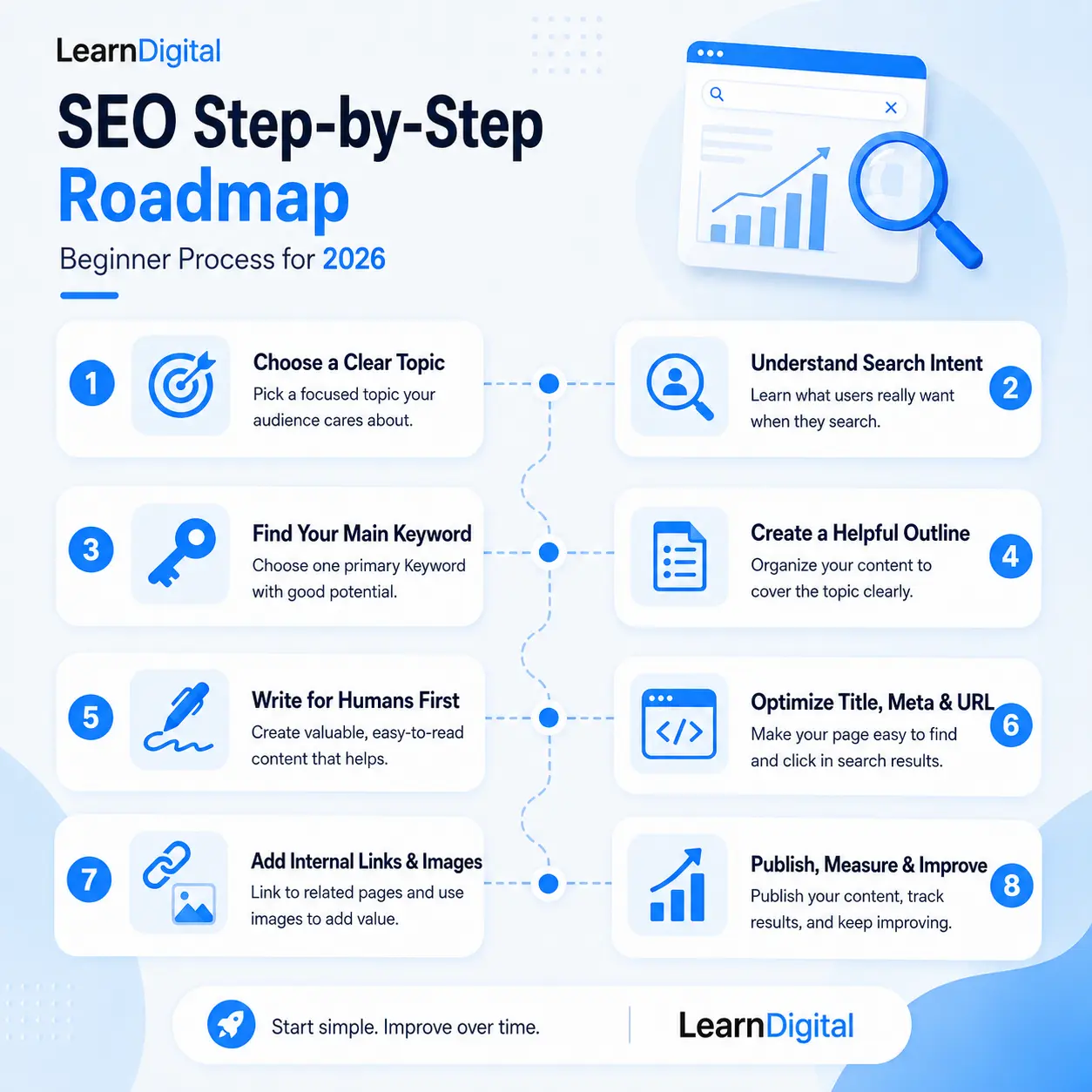
Every SEO strategy starts with keyword research. A keyword is simply the word or phrase someone types into Google. Your goal is to figure out which keywords your target audience uses, and then create content around those topics.
As a beginner, your instinct might be to go after big, broad keywords like SEO or digital marketing. The problem is that those keywords are incredibly competitive. You'd be competing with websites that have years of authority built up. It's like showing up to a Formula 1 race on a bicycle.
Instead, focus on long-tail keywords, which are longer and more specific phrases like how to do keyword research for beginners or SEO tips for small business websites. They usually have lower search volume, but they're also easier to target and attract people who know exactly what they're looking for.
Free tools to start with include Google Search autocomplete suggestions, Google Keyword Planner, and Ubersuggest.
Step 2: Optimize your content with on-page SEO
Once you know your keywords, it's time to actually use them, but in a smart and natural way.
Write for humans first, Google second
This might sound obvious, but it's easy to forget when you're trying to rank. Your content should genuinely help the person reading it. Write like you're explaining something to a friend.
Use your primary keyword in key places
Your primary keyword should appear in your page title, H1 heading, at least one subheading, the first paragraph of your content, your URL slug, and your meta description. You don't need to repeat it obsessively. A few natural mentions throughout the article are plenty.
Structure your content with headings
Use H1 for your main title, H2 for main sections, and H3 for sub-sections within those. Good heading structure helps both readers and Google understand how your content is organized.
Write a clear page title and meta description
Your page title and meta description are what people see in Google's search results. They should be clear, relevant, and give the reader a reason to click. Keep your title concise and your meta description focused on the real value of the page.
Use internal links
Linking between your own pages helps readers explore more of your content and helps Google understand how your site is structured. Every time you publish something new, look for natural opportunities to link back to older relevant posts, and vice versa.
Step 3: Get the technical basics right
You don't need to become a developer to handle technical SEO as a beginner. But there are a few fundamentals worth getting right from the start.
Make sure Google can actually find your site
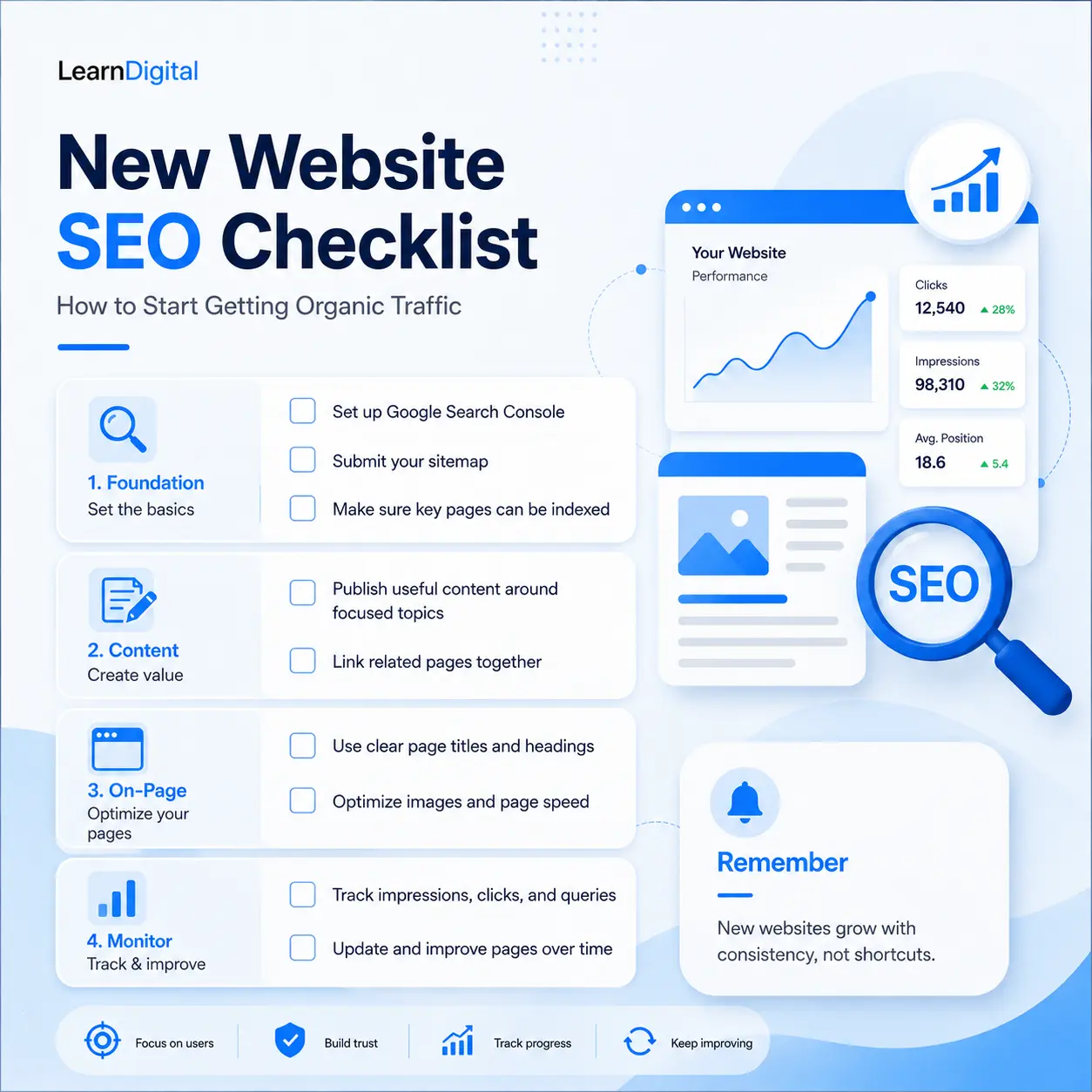
Submit your sitemap to Google Search Console. It's free, and it tells Google which pages exist on your site, which can help them get discovered more efficiently.
Check that your site is mobile-friendly
Most people browse on their phones. If your site looks broken on mobile, the user experience suffers. Most modern website builders handle this fairly well, but always double-check your important pages yourself.
Improve your page speed
Slow-loading pages frustrate users. Free tools like Google PageSpeed Insights can help you understand what is slowing things down.
Use clean, descriptive URLs
A URL like yoursite.com/seo-for-beginners is much clearer than something like yoursite.com/page?id=482.
Optimize your images
Compress image file sizes before uploading and always add descriptive alt text. This helps with accessibility and gives search engines more context about the image.
Step 4: Start building authority with off-page SEO
Here's where I'll be honest with you: off-page SEO, particularly link building, is harder and slower than the other two areas. As a brand-new website, don't panic if you have zero backlinks. Everyone starts there.
The best way to earn backlinks as a beginner is simply to create content that's genuinely useful and worth linking to. That's a long game, but it works.
A few starter approaches that don't require you to beg strangers for links include writing guest posts for relevant websites, getting listed in relevant directories, sharing your content in communities where your audience spends time, and collaborating with other creators.
You don't need hundreds of backlinks. A handful of links from trusted, relevant websites can matter much more than dozens of links from random, low-quality sources.
Step 5: Track what's working
You can't improve what you don't measure. Fortunately, there are free tools that make tracking your SEO progress very manageable.
Google Search Console is the most important tool for SEO beginners. It shows you which keywords your pages are ranking for, how many clicks and impressions you're getting, and whether there are any indexing issues on your site. Set it up from day one.
Google Analytics 4 gives you a broader picture of your website traffic, including where visitors come from, which pages they spend time on, and where they leave.
Check your data regularly, but don't obsess over daily numbers. SEO results take time to show up, and a week of low traffic doesn't mean your strategy is failing.
How long does SEO take to work?
Ah, the question everyone asks, and the answer that nobody loves.
The honest answer is that SEO often takes several months before you start seeing meaningful results, and sometimes longer. This is one of the biggest mistakes beginners make: they do everything right for a few weeks, see no traffic, and give up.
SEO is a long-term investment. The pages you optimize today are seeds you're planting. Some will sprout quickly; others will take time. But once they grow, they can keep bringing in traffic without ongoing ad spend.
The good news for beginners targeting long-tail keywords with lower competition is that you may start seeing early signs of progress faster, especially in the form of impressions and early rankings.
Common SEO mistakes beginners make
A quick heads-up on the most common things that trip up newcomers. I've made a few of these myself, not going to lie.
- Going after keywords that are far too competitive for a new site.
- Ignoring technical SEO basics like page speed and mobile optimization.
- Writing content that's technically optimized but genuinely not helpful to anyone.
- Not using internal links between pages.
- Expecting results in two weeks and giving up.
The biggest one? Treating SEO as a one-time task instead of an ongoing habit.
How to structure your content for better SEO: topic clusters
One of the smartest approaches for a new website is the topic cluster model. Instead of writing random blog posts on whatever comes to mind, you create a main pillar page on a broad topic, and then a series of supporting articles that go deeper on specific subtopics, all linked together.
This helps Google understand that your site has real depth around a subject, and it also creates a better reading experience for people who want to keep learning.
SEO tools for beginners worth knowing
You don't need to spend money on SEO tools when you're starting out. Here are the free ones that matter most:
- Google Search Console — for indexing, keyword data, and technical issues.
- Google Analytics 4 — for overall traffic and user behavior.
- Google Keyword Planner — for keyword research.
- Ubersuggest — for additional keyword ideas and competitor research.
- Google PageSpeed Insights — for diagnosing and fixing slow pages.
When you're ready to invest in a paid tool, Semrush and Ahrefs are common industry options, but don't rush there. The free tools will keep you busy for a while.
What to learn next
SEO is a big topic, and this guide is your starting point, not the finish line. Here's where I'd suggest going next, in rough order of priority:
- Start with keyword research, because it shapes everything else.
- Then learn how to write SEO blog posts that are actually useful and optimized.
- Get your technical SEO basics in order.
- Once you have content, learn more about internal linking and topic clusters.
- Track your progress with Google Search Console.
And if you haven't already, read the broader Digital Marketing for Beginners: The Complete 2026 Roadmap. It shows where SEO fits into the bigger digital marketing picture.
Quick recap: SEO for beginners in 2026
Here's what you've covered in this guide:
- SEO helps Google find, understand, and rank your website.
- There are three main types: on-page, technical, and off-page SEO.
- Start with keyword research and focus on more specific, realistic opportunities.
- Optimize your content with clear structure, good headings, and natural keyword use.
- Get the technical basics right from the start, including speed, mobile, and your sitemap.
- Build authority slowly through useful content and genuine backlinks.
- Track your progress with Google Search Console and GA4.
- Be patient. SEO takes time, but it can deliver lasting results.
You now know more about SEO than most people who claim they're doing it. Bookmark this page, take it one step at a time, and remember: you don't need to figure everything out all at once.