If you've ever stared at a blank screen wondering "but what should I even write about?" — keyword research is your answer.
Keyword research is the process of figuring out what words and phrases real people type into Google when they're looking for something. Once you know that, you can create content around those exact topics and give yourself a real chance of showing up in search results.
It sounds more technical than it is, I promise. In this guide I'll walk you through the whole process step by step — from understanding the basics all the way to picking your first keywords and knowing what to do with them. No prior experience needed, no expensive tools required (at least not yet).
I'll also be upfront: keyword research is one of those things you get better at over time. I'm still refining how I approach it myself. So think of this as a solid, honest starting point — not the gospel truth. 😄
What Is Keyword Research and Why Does It Matter?
Keyword research is simply the process of discovering which search terms your target audience uses — and then evaluating which of those terms are worth creating content around.
Here's why it matters so much: you could write the most beautifully crafted blog post in the world, but if nobody is searching for that topic, nobody will find it through Google. Keyword research removes the guesswork. Instead of writing what you think people want, you write what you know they're already looking for.
It's also the foundation of your entire SEO strategy. Every decision you make — what content to create, how to structure your pages, how to organize your website — should trace back to your keyword research. Think of it as the map before the road trip.
Key Terms You Need to Know Before You Start
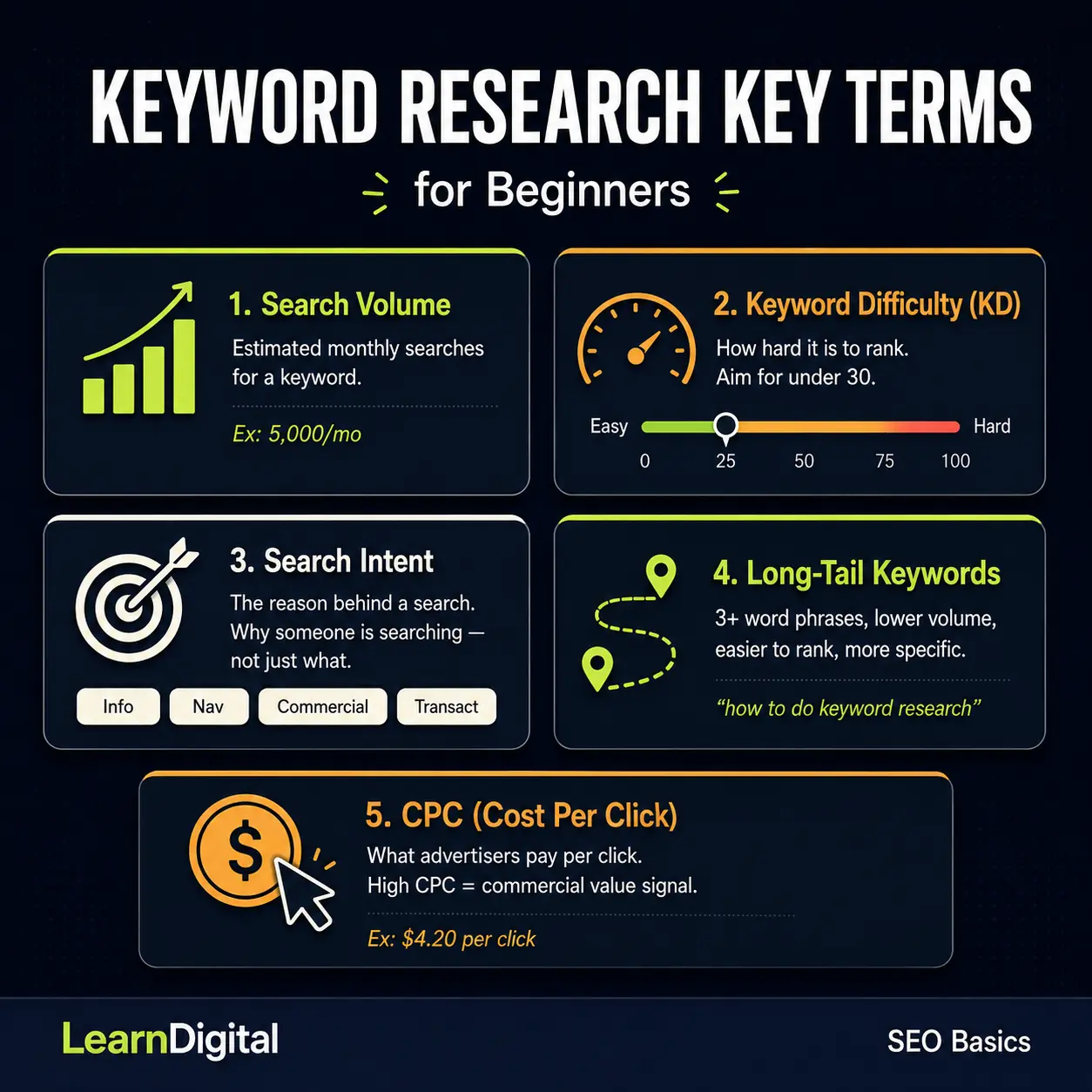
Before we get into the process, let's quickly demystify a few terms you'll run into constantly. I know, nobody loves a glossary — but these five will save you a lot of confusion later.
Search Volume
Search volume is the estimated number of times a keyword is searched per month. A keyword with 5,000 monthly searches gets a lot more traffic potential than one with 50. But — and this is important — higher volume almost always means higher competition too. More on that in a minute.
Keyword Difficulty (KD)
Keyword difficulty is a score (usually 0–100) that estimates how hard it would be to rank on the first page of Google for a given keyword. A score of 10 is much easier to crack than a score of 75. As a beginner with a new website, you want to focus on low keyword difficulty scores — typically under 30.
Search Intent
Search intent is the reason behind a search. When someone types "best SEO tools," they're probably looking to compare options (commercial intent). When someone types "what is SEO," they want an explanation (informational intent). When someone types "buy SEMrush plan," they're ready to purchase (transactional intent). Matching your content to the right intent is just as important as targeting the right keyword.
Long-Tail Keywords
Long-tail keywords are longer, more specific phrases — usually three or more words. "Keyword research" is a head term. "How to do keyword research for beginners" is a long-tail keyword. Long-tail keywords have lower search volume, but they're far easier to rank for, they attract more specific (and often more motivated) visitors, and as a new website they should be your best friends.
CPC (Cost Per Click)
CPC is how much advertisers pay per click on that keyword in Google Ads. You don't need to run ads to care about this number — a high CPC usually signals that the keyword has commercial value, meaning people searching for it are likely in buying mode. Useful context, not a dealbreaker.
Step 1: Start With a Seed Keyword
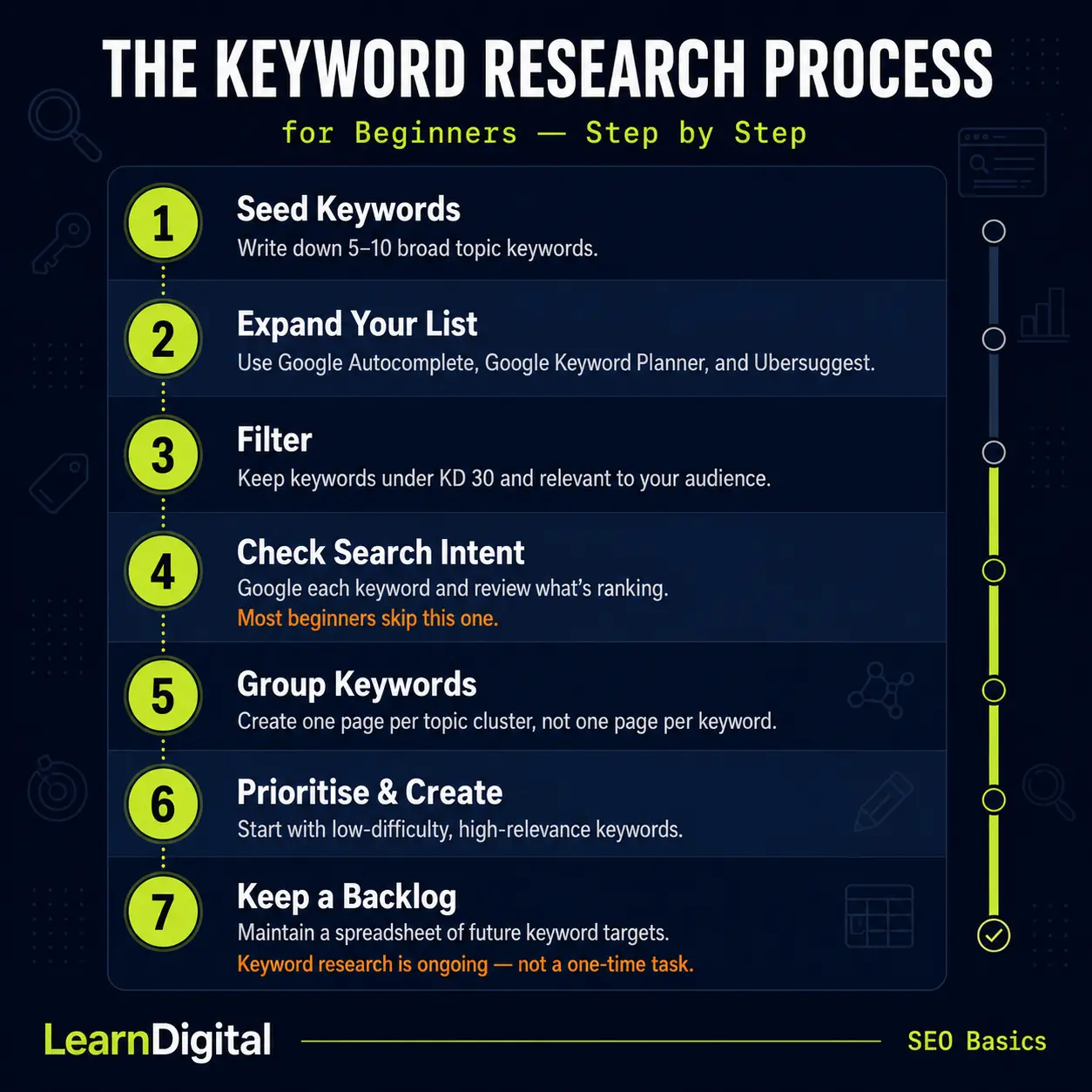
Every keyword research session starts with a seed keyword — a broad, simple word or phrase that describes your main topic. Think of it as the starting point, not the destination.
If your website is about digital marketing for beginners, some seed keywords might be: "SEO," "content marketing," "email marketing," "Google Ads," or "social media marketing."
You're not going to target these broad terms directly — they're way too competitive for a new site. But they're your launchpad for finding more specific, winnable keywords.
Write down 5 to 10 seed keywords that are relevant to your niche. Don't overthink it at this stage. You just need somewhere to start.
Step 2: Expand Your List Using Free Tools
Once you have your seed keywords, it's time to use keyword research tools to expand and refine your list. Here are the best free options to start with.
Google Search (Autocomplete and "People Also Ask")
This one is criminally underrated. Start typing your seed keyword into Google and look at the autocomplete suggestions that appear — those are real searches that real people are making. Scroll to the bottom of the results page and you'll also find "Related searches." These are goldmines of long-tail keyword ideas, and they cost you nothing.
Also pay attention to the "People Also Ask" box that often appears mid-page. Each question in there is a potential blog post or section heading for your content.
Google Keyword Planner
Google Keyword Planner is a free tool inside Google Ads. You don't need to run ads to use it — just create a free account. It shows you search volume ranges and related keyword ideas. The volume data isn't always precise (it gives ranges rather than exact numbers), but it's a solid starting point and it's coming straight from Google's own data.
Ubersuggest
Ubersuggest (by Neil Patel) offers free keyword research with actual volume numbers, keyword difficulty scores, and content ideas. The free version has daily limits, but for a beginner it's more than enough to get started.
Answer the Public
Answer the Public generates a visual map of questions, comparisons, and prepositions that people search around any topic. It's brilliant for finding content ideas and understanding the types of questions your audience has. The free version gives you a limited number of searches per day.
SEMrush (Free Plan)
SEMrush is one of the most powerful SEO tools in the industry, and it does offer a free plan with limited daily searches. Even with restrictions, you can get keyword volume, difficulty scores, and competitor keyword data — which is incredibly useful. If you're serious about SEO, this is worth getting familiar with early.
Step 3: Understand Search Intent Before You Commit
Here's a step that a lot of beginners skip — and then wonder why their content isn't ranking even though they targeted the "right" keyword.
Before you decide to write a piece of content around a keyword, Google it yourself. Look at the top-ranking pages. Ask yourself: what kind of content is Google showing for this search? Are the results mostly blog posts, or product pages, or YouTube videos? Are they long guides or quick answers? Are they beginner-friendly or advanced?
If you search "how to do keyword research" and Google returns detailed step-by-step guides (like this one), then Google has determined that people searching this want an educational tutorial. That's what you should create — not a product page or a one-paragraph answer.
Matching your content format and angle to what's already ranking is one of the most overlooked but powerful things you can do in SEO.
The Four Types of Search Intent
Informational intent — the person wants to learn something. Example: "what is keyword difficulty." Create educational content: guides, explainers, tutorials.
Navigational intent — the person is looking for a specific website or page. Example: "SEMrush login." This one isn't usually relevant for content creation.
Commercial intent — the person is researching before making a decision. Example: "best free keyword research tools." Create comparison posts, roundups, or reviews.
Transactional intent — the person is ready to take action. Example: "SEMrush free trial." Create landing pages or conversion-focused content.
As a beginner building an educational website, most of your content will target informational and commercial intent.
Step 4: Evaluate and Filter Your Keywords
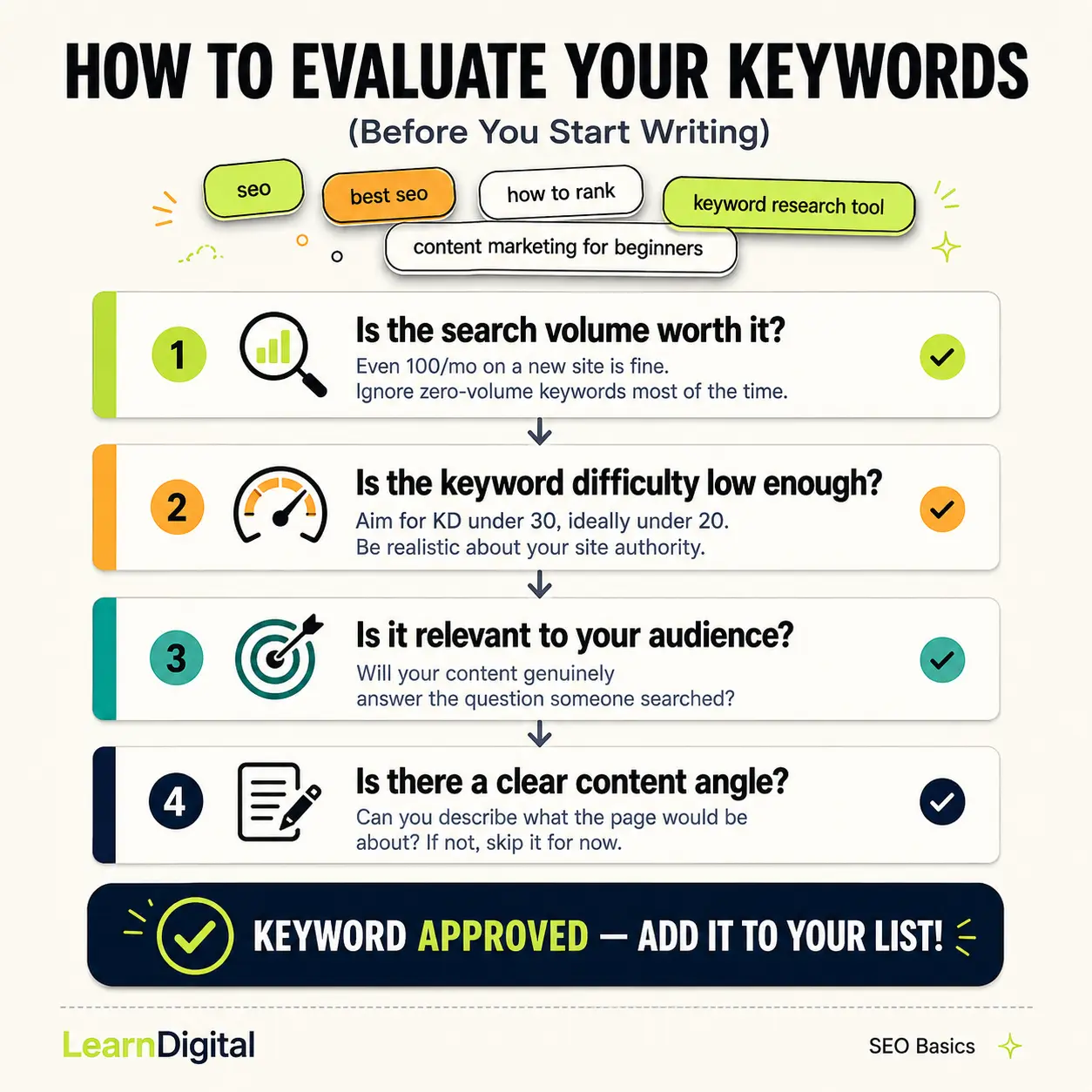
By now you probably have a big messy list of keyword ideas. Great. Now it's time to filter them down to the ones actually worth pursuing.
Here's what to look at for each keyword:
Is the Search Volume Worth It?
For a brand-new website, don't obsess over finding keywords with thousands of monthly searches. Even a keyword with 100 monthly searches is worth targeting if it's relevant and has low competition. Over time, as you publish more content and build authority, your rankings will compound.
Ignore keywords with zero volume entirely — unless they're highly specific long-tail phrases that clearly represent a real question people would ask. Sometimes tools show zero volume for searches that genuinely happen — they're just hard to measure.
Is the Keyword Difficulty Low Enough?
As a beginner, aim for keywords with a difficulty score under 30 — ideally under 20. You can occasionally target slightly harder keywords if the topic is critical to your site's strategy, but be realistic. A keyword with a difficulty of 70 means you're up against websites that have been building authority for years.
Is It Relevant to Your Audience?
This sounds obvious but it's easy to get distracted by keywords that look attractive on paper but don't actually serve your readers. Always ask: if someone lands on my page from this keyword, will my content genuinely answer their question?
Is There a Clear Content Angle?
For every keyword you keep on your list, you should be able to quickly describe what the content would be about. If you can't figure out what to write, that's a sign the keyword is either too vague or not a great fit for your site right now.
Step 5: How to Choose the Right Keywords for SEO as a Beginner
Once you've filtered your list, the next step is prioritization. Not all keywords should be treated equally — some will have a bigger impact on your goals than others.
Here's a simple framework for deciding which keywords to target first:
Focus first on keywords with the lowest difficulty and the clearest informational intent — these give you the best chance of ranking quickly and building early momentum. Next, identify keywords that are closely tied to your main topics (your "pillar" pages). These are the keywords that define what your site is about, and you'll want strong content around them even if the competition is a bit higher. Finally, keep a backlog of keywords you'd like to target in the future — once your site has more authority, you can revisit harder terms.
I try to think of it like building a reputation at a new job. You don't walk in on day one and try to run the whole department. You start with the tasks you can do well, build credibility, and gradually take on bigger challenges. Same logic applies to SEO. 😄
Step 6: How to Group Keywords for SEO
One mistake beginners make is creating a separate page for every single keyword variation. That leads to thin, repetitive content and confusion about which page should rank for what.
The smarter approach is to group related keywords and target them together on one page. For example, "how to do keyword research," "keyword research step by step," and "keyword research for beginners" are all essentially asking the same question. Those should all live on one comprehensive page — not three separate ones.
When grouping keywords, ask yourself: could one piece of content reasonably answer all of these searches? If yes, they belong together. If the searches are clearly looking for different things, they deserve their own pages.
This is also the foundation of the topic cluster model — where you have one main "pillar" page on a broad topic and several supporting articles that dive into specific subtopics. Each page targets its own keyword group, and they all link to each other.
Step 7: Check the Competition (Quickly)
Before committing to a keyword, do a quick sanity check on the competition. Google your target keyword and look at the first page of results. Ask yourself:
Are the ranking pages from huge, well-established websites (BBC, Forbes, major brands)? If so, that keyword is probably too competitive for now. Are there smaller blogs or newer websites ranking? That's a good sign — Google is willing to rank sites like yours for this term. Does the top-ranking content look thin, outdated, or not very helpful? That's an opportunity — you can create something better.
You don't need a tool for this. Ten minutes of manual searching will tell you a lot.
How to Use Google Keyword Planner for SEO (Quick Overview)
Since Google Keyword Planner is the most accessible free tool for beginners, here's a quick walkthrough of how to use it:
Go to ads.google.com and sign in or create a free account. From the menu, go to Tools and then Keyword Planner. Choose "Discover new keywords" and enter your seed keyword. Google will return a list of related keywords with estimated monthly searches and competition levels. Export the list to a spreadsheet and start filtering using the criteria from Step 4 above.
One thing to note: the "competition" column in Keyword Planner refers to advertiser competition (i.e., how many advertisers are bidding on that keyword), not SEO difficulty. They're related but not the same thing. For actual SEO difficulty scores, cross-reference with Ubersuggest or SEMrush.
How to Use SEMrush for Keyword Research (Beginner Version)
SEMrush is the tool I'd recommend getting familiar with even on the free plan, because the data quality is excellent. Here's the basic process:
Go to semrush.com and create a free account. In the left menu, go to Keyword Overview and type in your seed keyword. You'll see the monthly search volume, keyword difficulty score, CPC, and a list of related keywords. Click into the "Keyword Magic Tool" for a much larger expanded list — you can filter by keyword difficulty, volume, and question-based keywords. Pay special attention to the "Questions" filter — these are keywords phrased as actual questions, which are perfect for beginner educational content.
With the free plan, you're limited on daily searches, so use them wisely. Focus on your most important seed keywords first.
Common Keyword Research Mistakes Beginners Make
Let me save you some time by flagging the things that trip up almost everyone when they're starting out:
Chasing high-volume keywords with no realistic chance of ranking. Targeting one keyword per page instead of grouping related terms. Ignoring search intent and creating the wrong type of content for a keyword. Not checking whether a keyword already has a page on your site (creating duplicates). Treating keyword research as a one-time task instead of an ongoing part of your content process.
That last one is worth emphasizing: keyword research isn't something you do once and forget. It's something you revisit regularly as your site grows, new topics emerge, and the search landscape changes.
Putting It All Together: A Simple Keyword Research Process
Here's the whole process summarized in a way you can follow right now:
Write down 5 to 10 seed keywords that describe your main topics. Use Google Autocomplete, Google Keyword Planner, and Ubersuggest to expand your list. Filter by keyword difficulty (aim for under 30 as a beginner) and relevance to your audience. Check search intent by Googling each keyword and reviewing the top results. Group related keywords together — one page per topic cluster, not one page per keyword. Prioritize low-difficulty, high-relevance keywords and start creating content around those first. Keep a running spreadsheet or document with your keyword backlog for future content planning.
That's it. It genuinely doesn't have to be more complicated than that when you're starting out.